Cold open: what Tierwyn is, and isn't
Host Okay, so. You've got three terminals open, three agent CLIs installed, and a fourth one's asking permission to touch a file. Tierwyn starts from a pretty practical question: what if those agents all had one place to work? Today we're explaining Tierwyn, and the tagline is "Tiers of agents."
Builder Right. Tierwyn is a meta harness for coding agents. It's a single-operator command centre that drives several local coding agents from one browser UI, at your desk or on your phone, and it streams their events into that interface. It keeps every conversation on disk, and it supports cross-agent delegation, scheduled jobs, and voice in and out. And where they run matters. Tierwyn spawns agent CLIs on machines you control. By default, this one.
Host So it's not "send my repo to a hosted AI workspace and hope for the best."
Builder Correct. It's not a multi-tenant SaaS, it's not a hosted sandbox, and it's not a public HTTP API product. It's for a solo operator who self-hosts, maybe on a Linux box you reach from your laptop or your phone over a LAN or a VPN, and who wants one command centre for their own tools.
Host And the agents, they've got the same authority they'd have in a terminal?
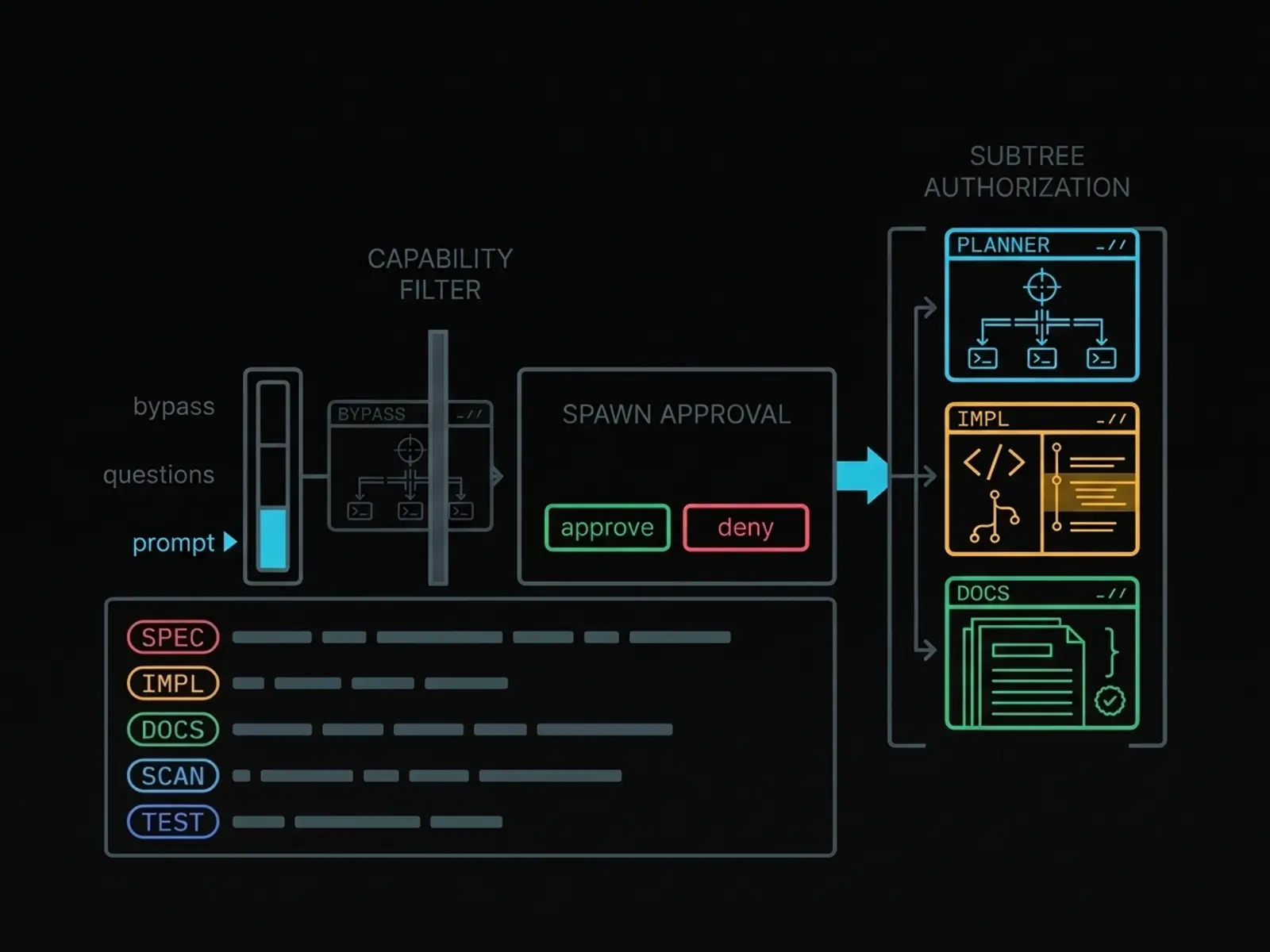
Builder By default, yes. They run with your local user privileges. Same as opening a developer shell in the project folder. Tierwyn has interaction modes, spawn approval, capability filtering, and an optional Bubblewrap sandbox. But you configure those. It doesn't pretend that a web interface turns a local shell into a hosted isolation boundary.
Host Huh, okay. I like that it's said up front. What else should people know before we get into the feature list?
Builder It's a single-maintainer open-source project under the MIT licence. It's independent of the companies behind the agent names it can drive. Those names are trademarks of their owners, and Tierwyn isn't affiliated with, sponsored by, or endorsed by any of them.
Host And both voices in this episode are synthetic.
Builder Yes. Both voices are AI-generated with Gemini TTS, through Tierwyn's gemini-podcast plugin. The script was fact-checked against the repository. And the voices are personas for this explanation. They're not claims about who a maintainer or a guest is.
Host Good. So, the short version: Tierwyn gives one trusted operator a browser workspace for local coding agents, with delegation and persistence, and it keeps the security responsibility visible.
Builder Exactly. It's a control centre around tools you already run. It isn't a promise that those tools have become harmless.
Many CLIs, one picker
Host Let's start with the picker. How many different agent types are we talking about?
Builder The server registry has sixteen agent types. Claude Code, Pi, Antigravity, OpenCode, KiloCode, Cursor, Hermes, Codex, Grok Build, Kiro, Qwen Code, OpenClaw, GitHub Copilot, Kimi Code, DeepSeek Harness, and Grok Bot.
Host Wait, that mixes local command-line tools with a desktop relay, doesn't it?
Builder It does, and the product keeps those differences meaningful. The adapters sit behind one event model. Each profile then ties an agent type to its own binary, its settings, and its authentication. And model discovery periodically refreshes the model catalogues, where the adapter supports it.
Host Does Tierwyn supply the vendor API keys for those models?
Builder No. It's deliberately CLI-first. Model calls go through the agent's own CLI or SDK, installed and authenticated locally. The product even says that no Anthropic API key is required for Claude Code. But you do still need each agent installed and authenticated the way that agent expects.
Host Okay. And the picker tells agents apart by how they handle permissions?
Builder Yes. Eight adapters can ask permission: Claude Code, Codex, Hermes, Grok Build, Kiro, Qwen, Kimi, and Grok Bot. They honour the stricter interaction modes, and they support per-tool gates or interactive questions.
Builder The other eight are bypass-only. That's Pi, OpenCode, KiloCode, Cursor, Antigravity, OpenClaw, Copilot, and DeepSeek Harness. They ignore the stricter modes and just run. So when a stricter mode is active, Tierwyn greys them out, or rejects them.
Host Right, that's a useful warning label. One picker doesn't mean identical behaviour.
Builder Exactly. A common event model makes the workspace coherent. It doesn't erase the differences between the underlying CLIs.
Host What about images and files?
Builder Vision attachments work when both the profile and the adapter support vision, and other files can be attached too. Native agent slash commands show up only where the CLI has them.
Host So the pitch isn't "one model." It's "one place to pick and operate lots of agents, with their limits made visible."
Builder That's the honest version, yeah.
Driving a conversation
Host Once I've picked an agent, what's the actual conversation like?
Builder You send a prompt into a session, and you see one normalised stream. Messages, tool calls, tool results, file changes, status changes. You can stop a generation that's in flight. And for adapters that allow it, you can steer a running process by injecting text straight into it.
Host "Steer" sounds different from just sending another message.
Builder It is. Force steer gives the operator a choice. Queue the message, or interrupt and send it. On an agent that can't be steered, a mid-turn message waits until the turn finishes, and then it drains as a follow-up. So you decide whether a correction should wait, or change the run that's happening now.
Host Does it expose the agent's reasoning settings too?
Builder Where the CLI supports them, yes. Profiles expose an effort or thinking level, like low, medium, or high, plus the interaction mode: bypass, questions, or prompt. It's adapter-specific, so the interface shows it as a setting. It doesn't pretend every agent has the same controls.
Host And there's a side-question command, right? Slash btw?
Builder That one's Tierwyn's own. It's an ephemeral side question. You ask something that knows the context, without derailing the turn that's running. It sits next to the agent's native slash commands. It doesn't replace them.
Host Huh. So it's a conversation workspace with a few operator controls borrowed from a process monitor.
Builder That's fair. And the transcript and the activity stream stay the centre of gravity. You can collapse tool calls and results. Markdown and diagrams render in the transcript. And usage info covers token counts, cost, and provider quota windows.
Cross-agent delegation
Host Okay, now the mechanism the whole product is built around: delegation. What happens when one agent needs another?
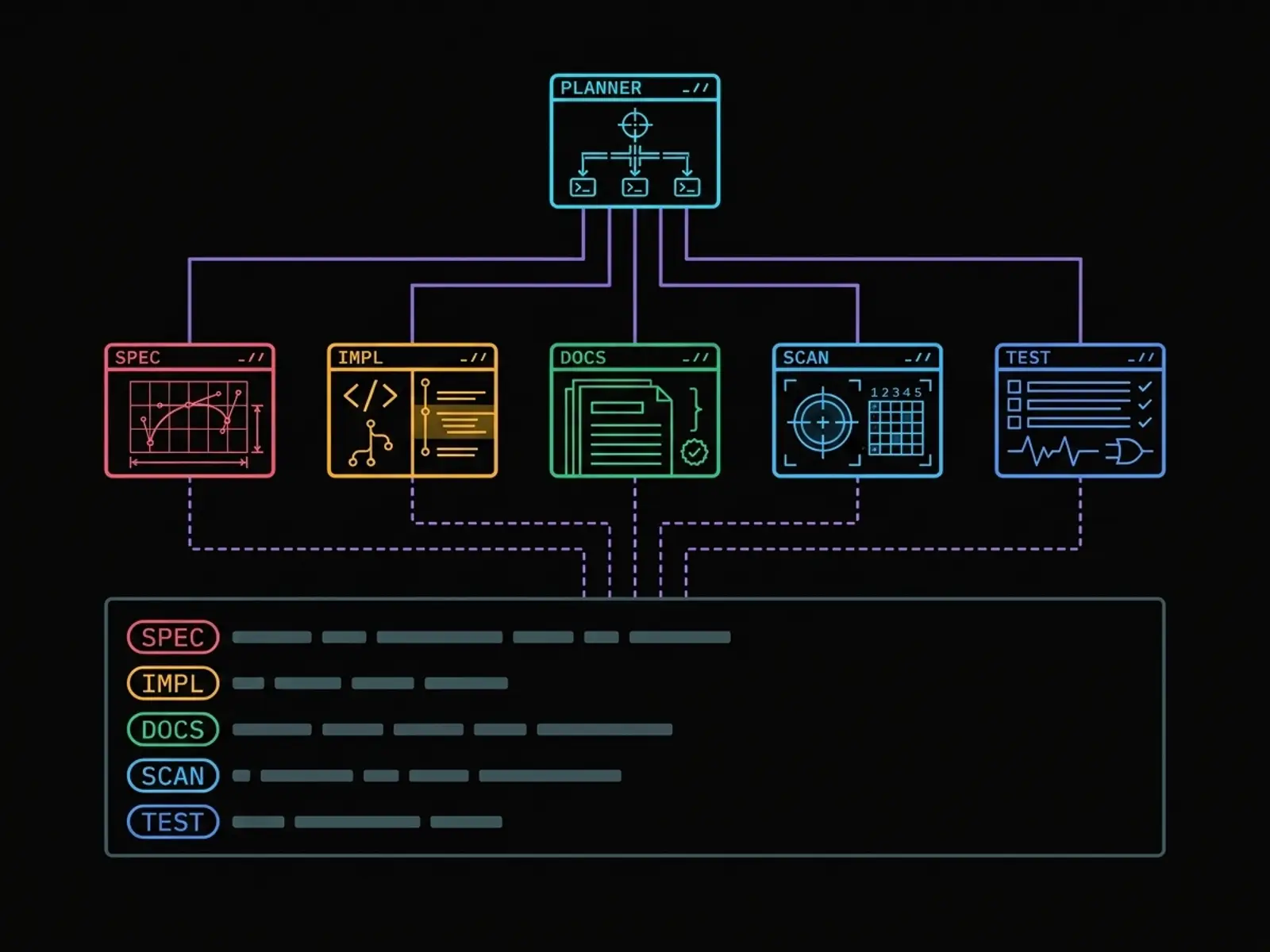
Builder A parent conversation can spawn a child conversation. The child runs on the same engine as a turn you'd drive yourself in the web UI, and it's stored as a normal conversation, linked to its parent. So delegation is part of the workspace model. It's not a separate batch runner bolted on the side.
Host How does an agent actually ask for a child?
Builder Through a spawn endpoint on the local server. There's a simple JSON form for one-line tasks, and a raw form where the prompt goes in as plain text. The raw one avoids the quoting and escaping mess you get when a prompt is big, or full of shell syntax. In practice, the agent writes its task to a file and posts the file.
Host And how does the parent decide what the child's allowed to be?
Builder Spawn templates. They map named roles to profiles and guidance. For agent-initiated spawns, that roster is a server-enforced allow-list. An agent can pick roles on its roster, and nothing else. If it asks for something off the roster, it gets refused. Spawns from the operator's own UI aren't restricted that way.
Host And the token the agent uses, that's not some permanent API key?
Builder No. Spawn tokens are ephemeral. They're minted in memory for a session, bound to that conversation, and revoked when the session finishes. There's also an idle backstop, thirty minutes by default. And live tokens get redacted before events are saved or broadcast.
Host What's the normal wait behaviour?
Builder Delegation is asynchronous by default. The parent can finish its turn while the child runs. When the child settles, a one-shot notification pushes the child's answer back into the parent's queue. The UI skips a duplicate prompt echo, while the model still gets the complete result.
Host Ah, that's where the little result marker in the tree comes from.
Builder Sort of. But there's a reliability worry behind it. Tierwyn asks delegated work to end with a structured result section, with files, decisions, and notes, and to put multi-step artefacts in files. A watcher looks for terse acknowledgements or missing prose, and flags a degenerate result. The parent can then recover the full transcript, and an automatic recovery notice points it there when it's needed.
Host So the system treats "Done" as a possible failure.
Builder Yes. If a child changed files but only said "Done," the parent doesn't have enough to coordinate safely.
Worked example: building this website
Host Let's make this concrete, with the site we're sitting inside. Who actually built it?
Builder A whole tree of agents. At the root sat one orchestrator, a Claude Code conversation running Opus. Its template came with a roster of roles across several agent CLIs, and each role has a note saying when to use it.
Host So it just grabs whichever one it likes?
Builder No, it matches the job to the role. Cursor with Grok was the primary implementer, so it built the page skeleton, the scripts and the build pipeline. Two Antigravity Gemini profiles split the visual work. Hydrogen did the design tokens, the styles and the animated hero, and Flash did the facts sheet and every illustration.
Host And the words?
Builder GLM, running through Pi, wrote the page copy and fact-checked this script against the repo. Codex with GPT drafted the first script. And Claude Code Sonnet produced the audio you're hearing: the voices, the chapters, the transcript.
Host Huh. So that's, what, six or seven different models on one website?
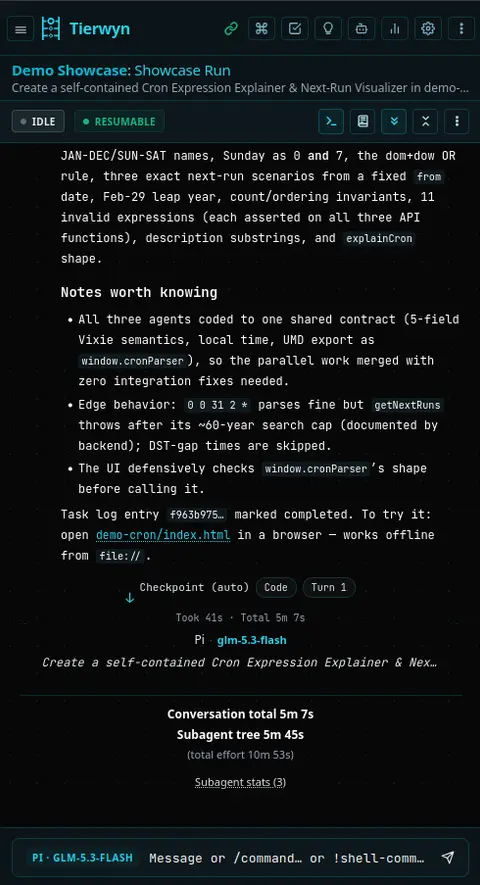
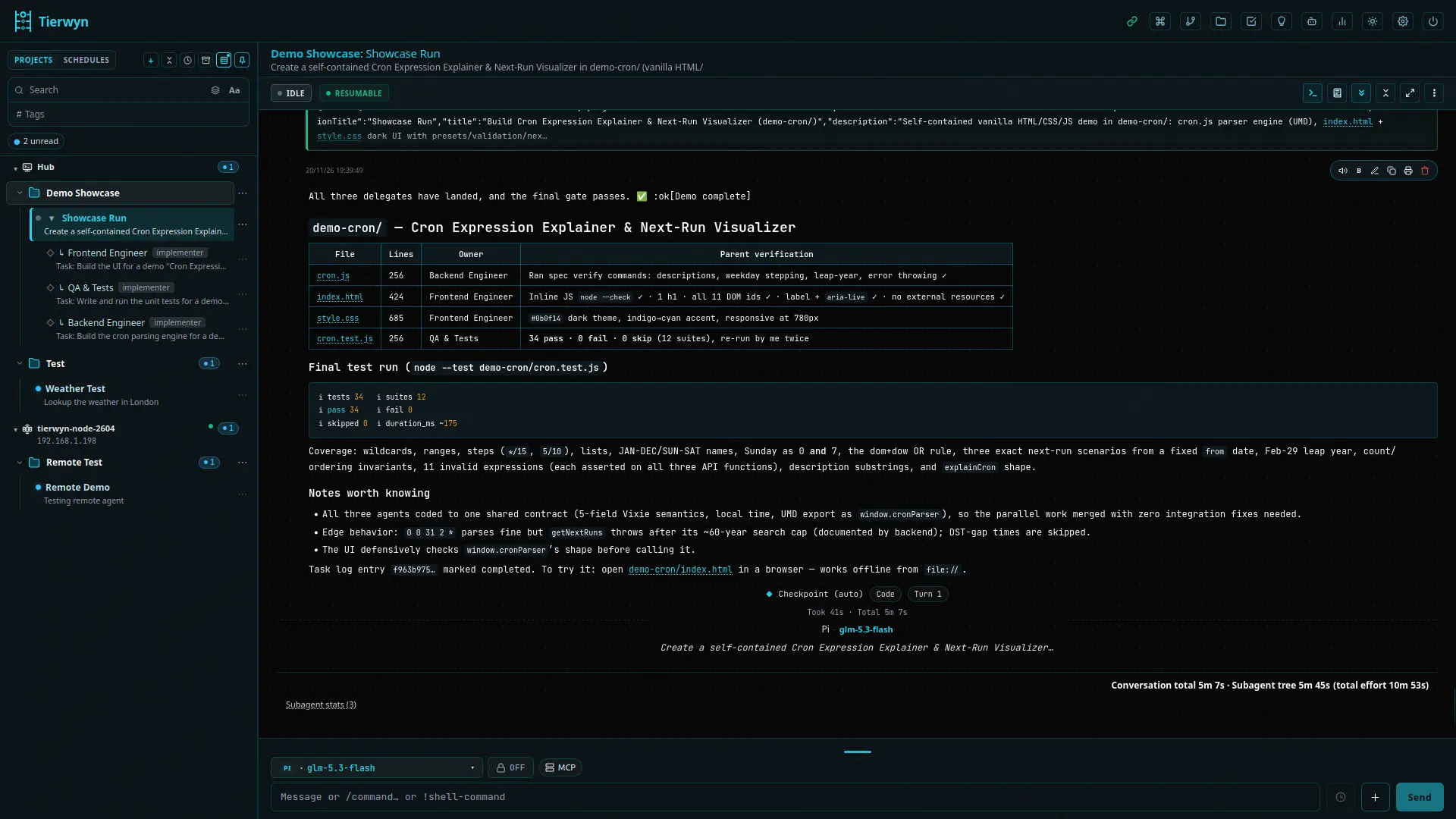
Builder Seven, counting the orchestrator, through five different agent CLIs: Claude Code, Cursor, Antigravity, Codex and Pi. All folding back into one conversation. Not all at once, though. The orchestrator can run three children at a time, so the work went out in waves. The first build, overnight, took thirteen child conversations, thirty-two turns, and about five hours forty of agent work, all one level deep. Open the sidebar and you can see it: one parent with its children under it, each tagged as implementer, research, documentation lead and so on.
Host How does a child know what it's allowed to touch?
Builder Every task is a file. It lists the inputs, the files that child owns, the files it must leave alone, and what "done" means. The child ends with a result section and writes a copy to disk. The parent doesn't poll; it gets woken when the child finishes.
Host Did it all go smoothly?
Builder Mostly. One role pointed at a profile that wasn't enabled, so the orchestrator picked a fallback. And one child got stuck mid-turn. The parent stopped it and started a fresh one with the same task. That's the kind of control you want.
Host And after the first build?
Builder The orchestrator checked the page itself, on desktop and mobile, in both themes, with accessibility checks. Then it split the fix list by owner: styles back to Hydrogen, markup to Cursor, images to Flash. Then the operator weighed in. Warmer voices, a section on using it from your phone, and two features we'd missed, Remote Hosts and the git panel. Flash audited the docs for anything else missing, and GLM caught a few mistakes in that audit. Models checking each other.
Host So the podcast isn't a metaphor pasted onto the page. It was made the same way the page describes.
Builder Exactly. Delegation doesn't remove coordination. It makes it explicit: roles, owned files, results, fallbacks, and a review pass.
Host So when the tree wound down, what's actually left behind? Besides the site itself.
Builder Two trails. The first is files. Every delegated task on this project was a file, with the plan, the files that child owned, and what "done" meant, in a dot-tierwyn delegates folder. And every child wrote its result next to its task.
Host In the repo?
Builder In the project, not the repo. That folder is gitignored, so it never gets committed, and it's not a database. Just files on disk. But children share the project folder by default, so any later agent, a fresh child, a scheduled job, a different model, can open it and pick up the plans and the results without you re-explaining the history.
Host And the second trail?
Builder Memories. While an agent works, it can save a short note: a gotcha, a decision, a fact. Later prompts get the relevant ones pushed in ahead of the text, shown as a little chip in the transcript, and any agent can search the store mid-task.
Host Can an agent plant instructions in there?
Builder No. Memories are reference notes, never instructions. An agent can suggest a rule, but nothing takes effect until you confirm it. And you review, edit, and supersede everything in one place.
Host Did this build actually leave any? Honestly.
Builder Honestly, it's early days. The feature is experimental and not fully assessed yet. But yes, there are two: one about which text-to-speech models refuse multi-speaker mode, and one reminding us the docs aren't a complete feature list. Small things. The next agent just starts a little warmer.
Spawn trees, worktrees and Git
Host Let's stay with the tree. How does an operator actually see all these sessions?
Builder Agent Activity. It shows in-flight and completed sessions across projects, as visual spawn trees. You get elapsed durations, stop buttons, unread clearing, and a tab for pending timers. And in the workspace, child conversations fold and unfold under their parents.
Host How deep can a tree go?
Builder Five levels by default, and you can change that. Breadth is capped separately: the server limits how many children each parent can have running at once. If a cap is zero or unset, spawning is off. It fails closed. And going over a cap is refused rather than queued.
Host What about files? If five agents are working on one repo, are they all editing the same checkout?
Builder The parent picks a workdir mode. Shared runs the child in the main project folder. Worktree creates an isolated Git worktree next to the project, named after the child conversation. If the project isn't a Git repo, a worktree request is rejected. It doesn't silently fall back. The operator has to retry explicitly and confirm the shared folder. And worktrees aren't deleted automatically when a child finishes.
Host And the Git side? If an agent finished work in a worktree, do I have to leave the UI to commit it?
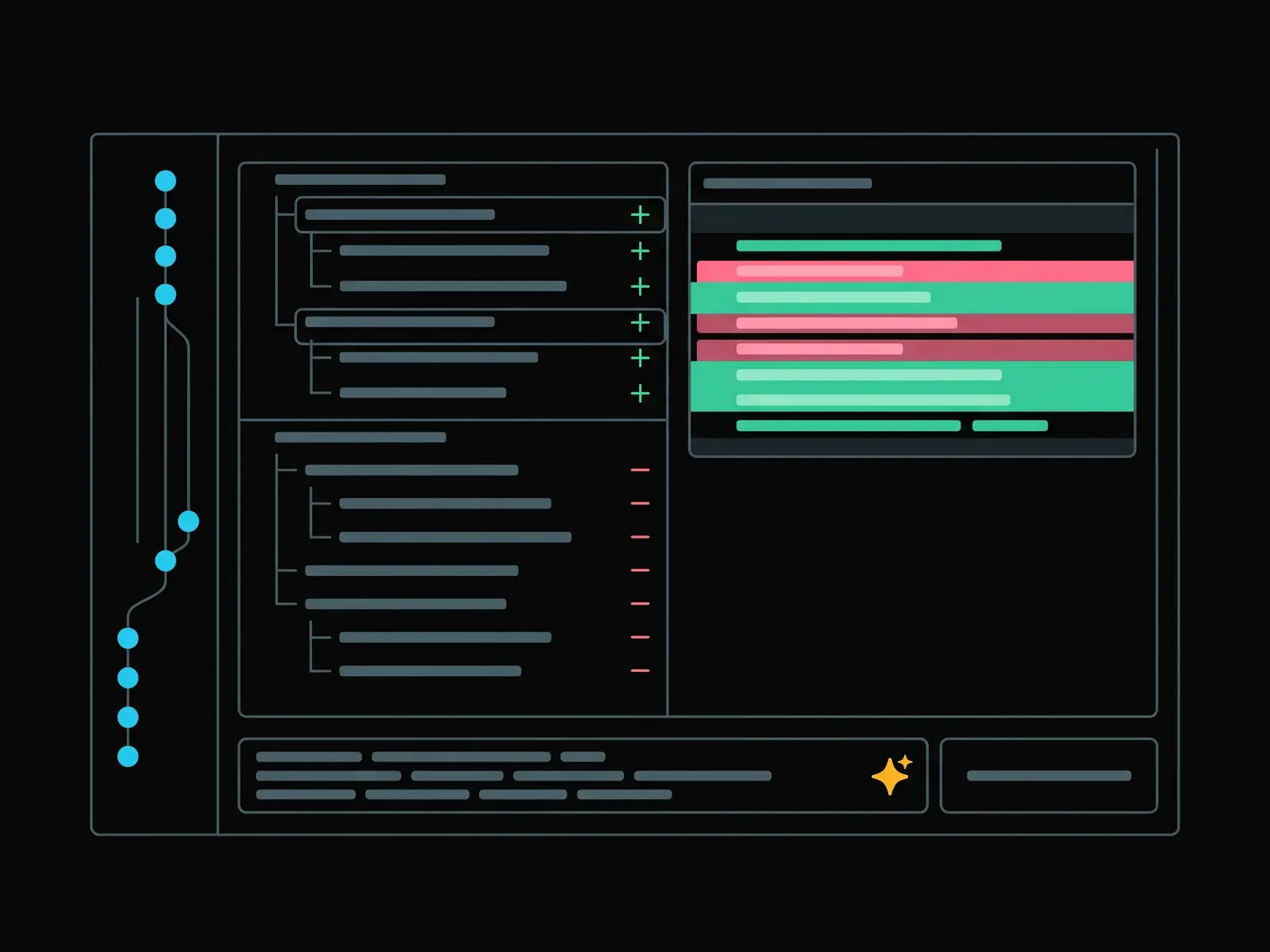
Builder No. There's a Git working tree panel, from the command palette or a conversation's menu. It shows staged and unstaged lists for the project root or any conversation worktree. You stage per path or all at once, click a path to see its diff, and commit and push from the same place.
Host And the commit message? I'm guessing there's an LLM in here somewhere.
Builder There is, and you trigger it yourself. A Generate button drafts the message from the staged diff only, plus recent commit subjects, using the commit model you pick in Settings. No transcripts, no environment, no secrets.
Host But does it commit for me?
Builder Never. Generate only fills the box. You edit it, and nothing commits until you press Commit, which asks you to confirm. You can cancel a generation, too.
Host What about hooks? And pushing?
Builder Pre-commit hooks always run; there's no way to skip them. Pushing asks for confirmation on protected branches, and there's no force push at all.
Host And if an agent's still working in that tree?
Builder Then branch switches, pulls, and stashes are refused. And the panel is for you, in your browser. Agents can't call it.
Host There's also a spawn approval gate.
Builder Right. When it's on, agent spawns go into a pending queue, and you approve or deny them in the UI. Agents can't approve their own spawns. And once you approve a child, it runs its whole subtask without asking again, because your approval covered the task as a whole.
Host And mesh messaging, that's siblings talking sideways?
Builder If the operator turns it on, yes. Agents can see their neighbours in the tree, parent, child, or sibling, and send each other short messages. Those messages are treated as untrusted peer data, and messaging is switched on separately from just seeing the tree.
Host That's a lot of machinery for "ask another agent."
Builder It's machinery for making "ask another agent" observable, bounded, and recoverable.
Scheduling
Host Delegation is interactive. What does Tierwyn do when the work should happen later?
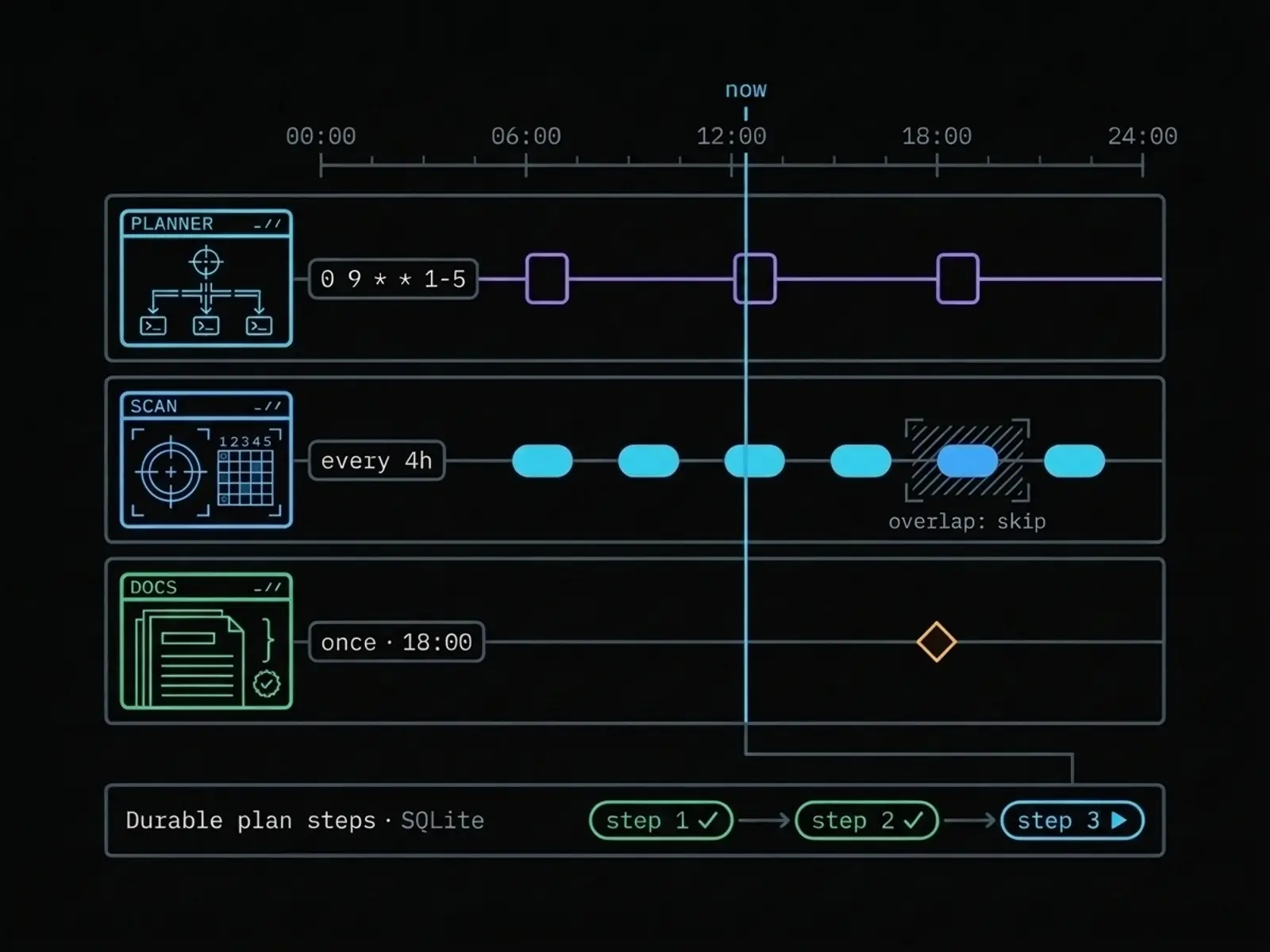
Builder Project schedules support interval, cron, and one-shot triggers. A schedule can keep ordered, durable plan steps, with statuses like pending, ready, running, done, and blocked. And each run gets the current step and its context.
Host And my own house rules? Do scheduled runs know them?
Builder They do. Operator rules are standing instructions that only you can write, per project or per conversation. Every spawn and every scheduled run inherits them, and children can't opt out. Rules never grant permissions, though. And whatever you type in the current message beats all of them.
Host How does it stop two runs colliding?
Builder There's a hard rule: two runs of the same job are never active at once. With skip, an overlapping fire is recorded as skipped, and the next one goes ahead. With queue one, a single crash-safe latch remembers one owed run, and drains it after the current run finishes. With catch-up, missed slots drain one at a time as runs complete.
Host Are there ready-made workflows?
Builder Six schedule packs ship with Tierwyn. Single PR, Phased Feature, Feature Wave, Fix from Failure, PR Review, and Verify After Change. A pack creates the steps, the prompts, and optional repository policy files. You can also import custom packs, or turn an existing job into one.
Host Can an agent create a schedule by itself?
Builder It can, within limits. One-shot jobs can be at most seven days out, and stay on the agent's roster. Recurring jobs an agent creates start disabled, and wait for you to review them, unless the project explicitly allows it. And if spawn approval is on, every agent-created job waits for you to enable it.
Host Okay, and a self-timer is different from a recurring job?
Builder Yes. An agent can schedule a wake-up for its own conversation, up to eight hours out, if you've allowed self-timers. It's a bounded way to continue. It's not a licence to create an invisible infinite loop.
Voice in and out
Host You mentioned voice earlier. Let's start with getting words into the composer.
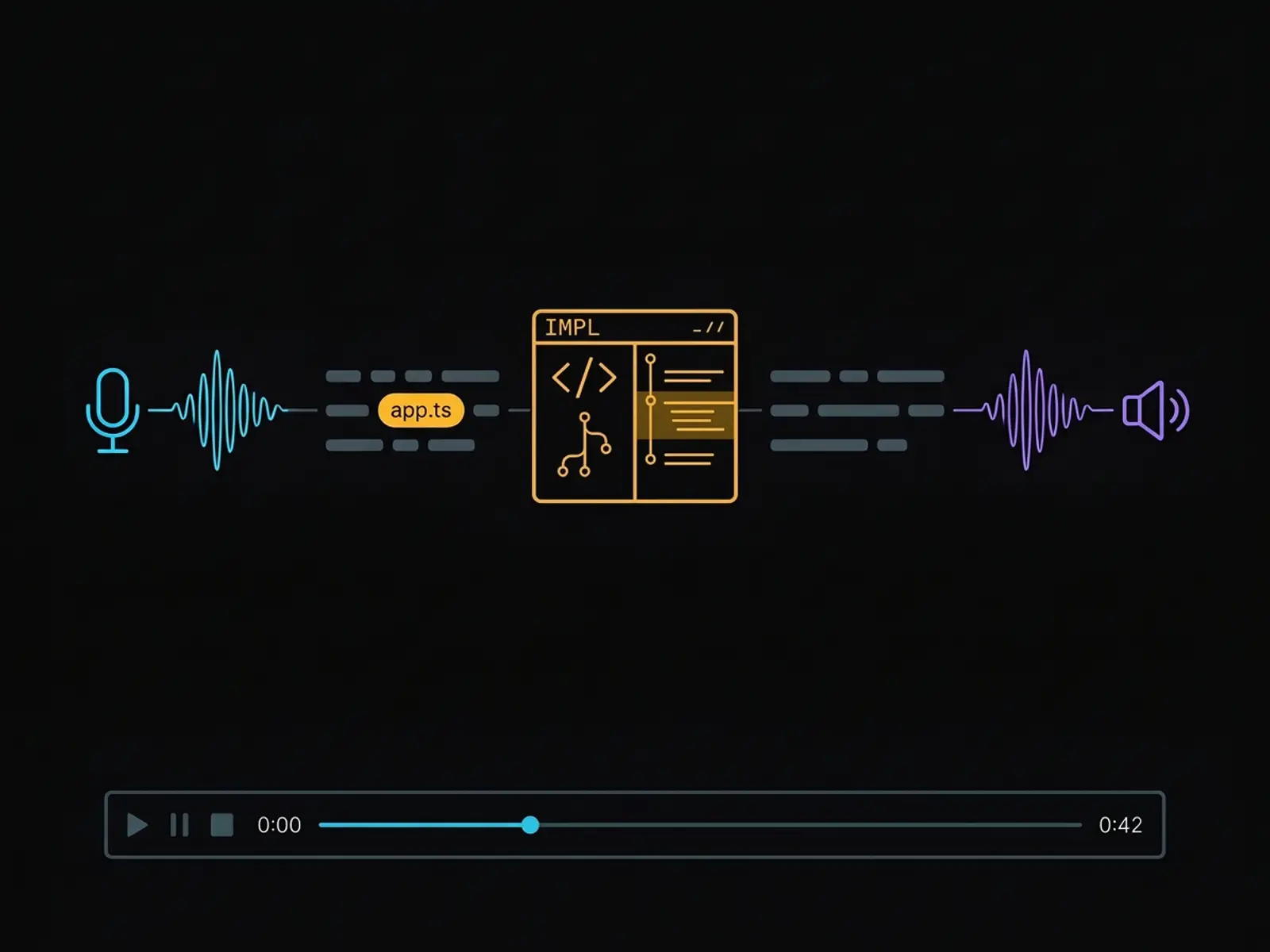
Builder Dictation can use a local Whisper binary, or the browser's own speech recognition. The Whisper strip has Fast and Slow modes. Fast puts the raw transcription straight into the composer, with no LLM in the way. Slow gives you choices: enhance with context, enhance with the project, or cleanup only. And project enhancement is read-only. It uses symbols and filenames that really exist in the repository, to correct speech errors.
Host And the other direction? Speaking answers back?
Builder Tierwyn supports browser speech, Piper, and Kokoro. It can speak an assistant message, and it can park and queue playback in a persistent player bar. Clips are saved with the project. There's also an optional summarise-before-speak pass, which can shorten an answer before it's read out.
Host Does Tierwyn install and supervise those voice services?
Builder No. Piper and Kokoro are local services you run yourself, outside Tierwyn, and Whisper is started on demand. If a configured voice service is down, Tierwyn falls back gracefully to browser speech.
Host Ha, that "no" is important again. A sidecar is part of your deployment. It's not magically managed infrastructure.
Builder Exactly.
Plugins and MCP servers
Host This episode itself uses a plugin, so let's explain that layer.
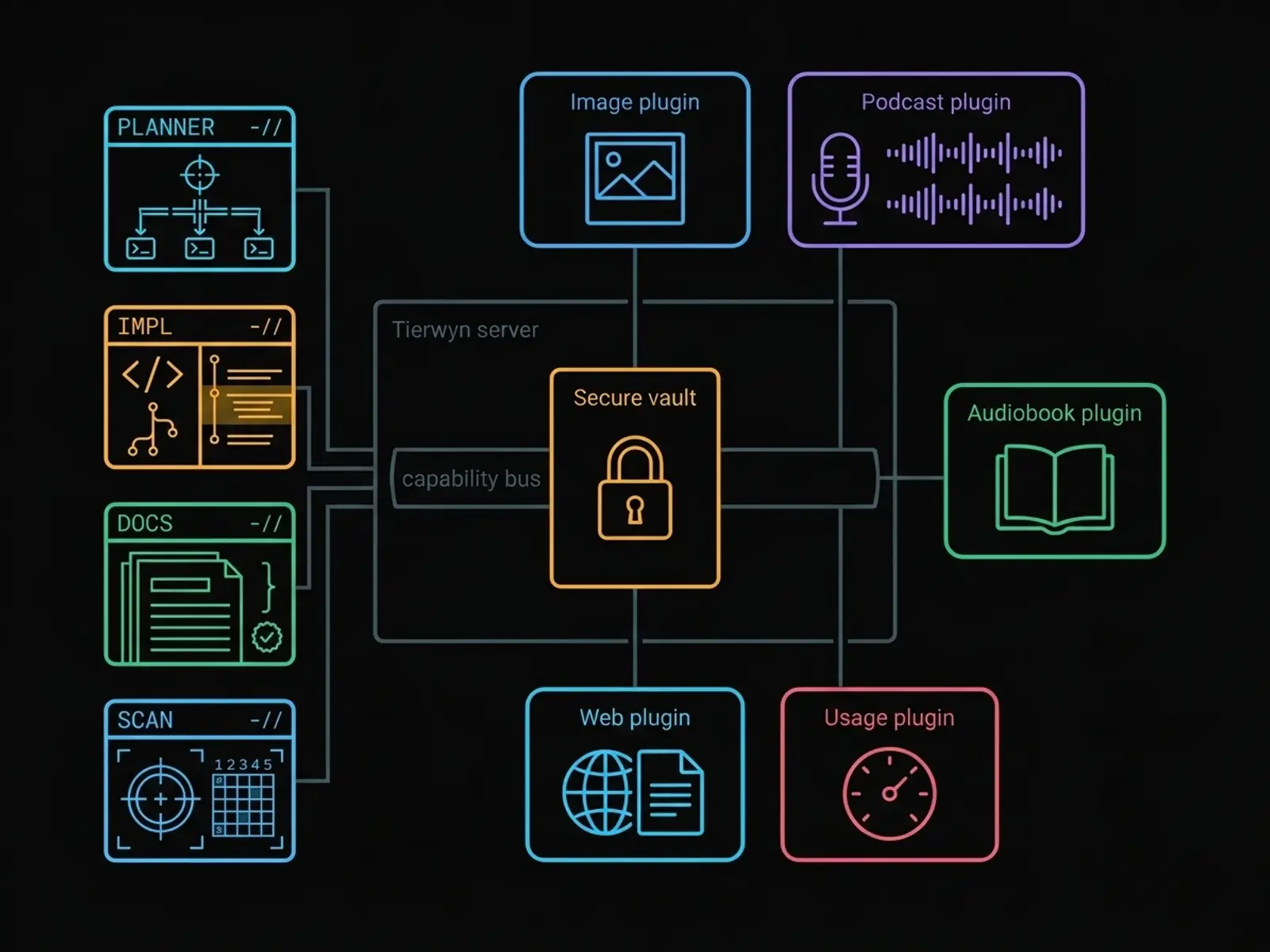
Builder Server plugins live in a plugins folder on the Tierwyn host. The installed catalogue has eight. Firecrawl, gemini-image, gemini-audiobook, gemini-podcast, and several usage providers.
Host What can those actually do?
Builder Firecrawl can scrape, search, crawl, map, and extract structured web content. Gemini Image generates or remixes images. Gemini Audiobook can narrate a whole chapter, with a narrator and character voices. Gemini Podcast can write or edit a multi-speaker script, and render one to ten speakers to WAV or MP3. And the usage plugins show provider quota or credit information.
Host So this audio came out of that podcast plugin?
Builder That's the production path for this episode. The script gets fact-checked, then rendered in parts with the same two voices every time, and joined together. The script side has actions like write, podcastify, improve, lengthen, shorten, expressions, and translate.
Host What keeps plugin credentials from leaking into the agents?
Builder They live in an encrypted vault, and they're scrubbed from agent environments. Agents call plugin capabilities through scoped, per-conversation routes, and every call is logged. Each plugin ships a help file the agent can read first. Which is why a careful workflow reads the help before it composes a request.
Host And MCP servers? Everyone's going to ask.
Builder There's a registry for those. You configure MCP servers once in Settings, local commands or remote endpoints, and the secrets go in the same encrypted vault. They're never put on a command line, and known values are redacted from transcripts.
Host And every agent gets every server?
Builder No. You choose per conversation, starting from the template's list, and you can limit a server to certain agents. Spawned children get only their role's list, or nothing. And by default, MCP servers are dropped from conversations that can delegate, so an untrusted tool can't steer a whole tree. One caveat: some CLIs, Cursor and Antigravity for example, load their own MCP config instead, and Settings shows those read-only.
Host And there's a global kill switch for plugins.
Builder Yes. One setting turns plugin loading off entirely, and you can disable individual plugins too. Plugins add reach, but they're still explicit server components, with their own permissions and rate limits.
Persistence
Host Let's talk about the part that makes this more than a transient terminal multiplexer: persistence.
Builder Tierwyn stores projects, conversations, events, checkpoints, handoffs, summaries, schedules, runs, and plugin calls in a local database. The event stream is normalised and ordered per conversation: messages, tool calls, tool results, file diffs, and status changes.
Host Does "stored" mean everything stays forever?
Builder By default, yes. Retention is off. If you turn it on, a nightly job purges idle, unpinned conversations older than the number of days you chose. Pinned conversations and their children are protected. Archived conversations are exempt. And anything purged is written to archive files before it's deleted.
Host Okay, and checkpoints. What are those, here?
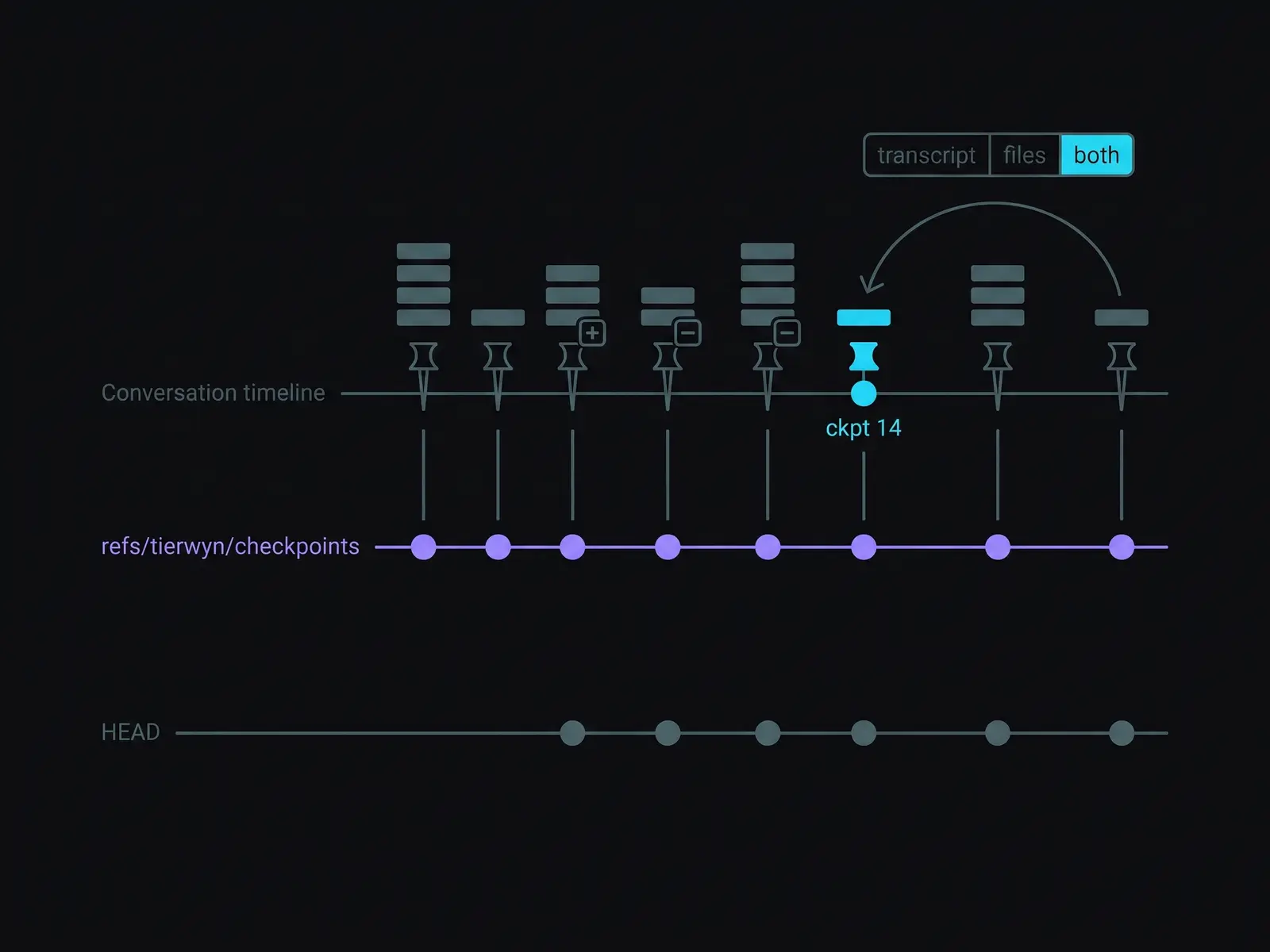
Builder After each completed turn, Tierwyn records an automatic checkpoint. It never fails the turn. And when the project files have changed, it takes a snapshot as a hidden Git commit, on a private ref. That snapshot doesn't move your branch, and it doesn't touch your ordinary Git history. You can inspect diffs, and restore the transcript, the files, or both.
Host And handoffs. That's not just "copy the last answer into a new chat."
Builder No, it can be more deliberate. There are resume modes. Native resumes the agent's own session. Transcript replays the raw history with attachments. Compacted primes the conversation with a rolling summary. And fresh starts with no priming at all. When you switch profiles, you can continue the same session, start a new one, or hand off with a summary or the full transcript.
Host So you've got a recovery story at the file level and at the conversation level.
Builder Yes. With the usual caveat. Persistence isn't a substitute for backups or review. It's a way to inspect and resume the work Tierwyn has recorded.
Security model and Bubblewrap
Host We've put off the uncomfortable chapter long enough. What's the threat model?
Builder Tierwyn is designed for one trusted operator, who owns the host machine, the password, and the repositories. It explicitly doesn't support public multi-tenant hosting, untrusted repositories or prompts, shared logins, or turning authentication off on an instance that's exposed to a network. Its mitigations can reduce the blast radius. But it doesn't claim to prevent prompt injection against an agent that's running in bypass mode.
Host Okay. And what does Safe Mode add?
Builder Four layers, and we've met most of them already. The interaction modes, from automatic approval to approval cards. Capability enforcement, which greys out bypass-only agents in the stricter modes. The spawn approval gate. And the rule that an approved child runs its whole subtask, because you approved it as a whole.
Host And Bubblewrap is optional OS-level isolation. It's not a claim that every agent is sandboxed.
Builder Right. Bubblewrap can wrap an agent process in its own private view of the system. It gets a temporary scratch folder, system paths are read-only, and the project folder stays writable. And it hides sensitive paths: your SSH and GPG keys, Git credentials, Tierwyn's own configuration, and the project's dot env files.
Host What does it not do?
Builder It doesn't filter environment variables by itself. It doesn't cut the network, so agents can still reach their APIs and download packages. The project folder stays writable, and the agent still runs as your user. Grok Bot is never sandboxed, because it attaches to an external desktop app. And a sandboxed parent can only spawn sandboxed children.
Host And exposing it remotely?
Builder Read the security docs first. The hardened setup keeps Tierwyn itself listening only on the local machine, and puts a TLS reverse proxy with WebSocket support in front of it. And don't casually expose a local-privilege agent controller to an untrusted network.
Host The line I'd keep is the project's own: "Treat it like shell access to your projects, because that is what it is."
Builder Yeah. That's the right mental model.
From your phone, on any machine
Host With that model in mind, the question I'd ask first: does this only work at a desk? Can I use it from my phone?
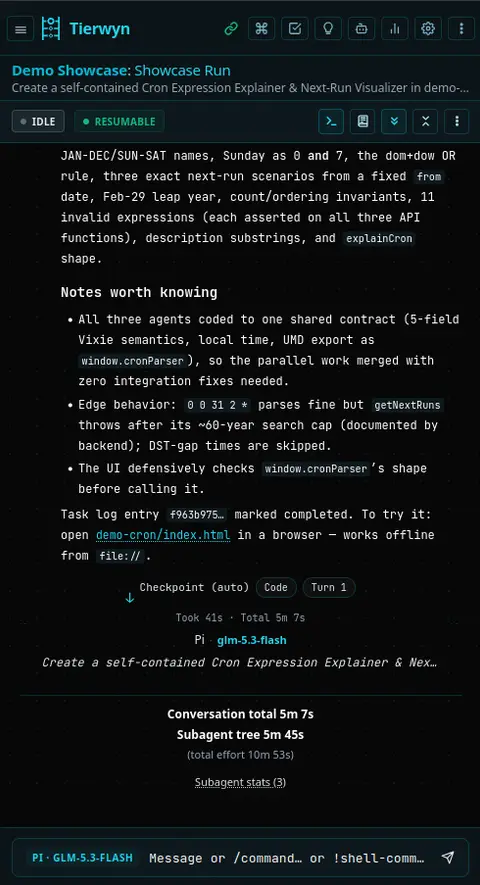
Builder You can. It's a web UI, and the layout is built for phones too. Serve it through a TLS reverse proxy with WebSocket support, on your LAN or over a VPN, and you can install it to your home screen like an app.
Host And can I actually do anything from there, or just watch?
Builder It's the whole UI, not a viewer. Start a conversation, pick an agent, steer or stop a run, kick off delegation, watch the spawn tree in Agent Activity, answer approval cards, and dictate prompts by voice.
Host And notifications? If an agent run's going to take a while, I'm not going to stare at the screen.
Builder Web Push covers that. Notifications reach you even when the app's closed. One catch, though: push needs HTTPS.
Host But the agents are still running on my machine. Not on the phone.
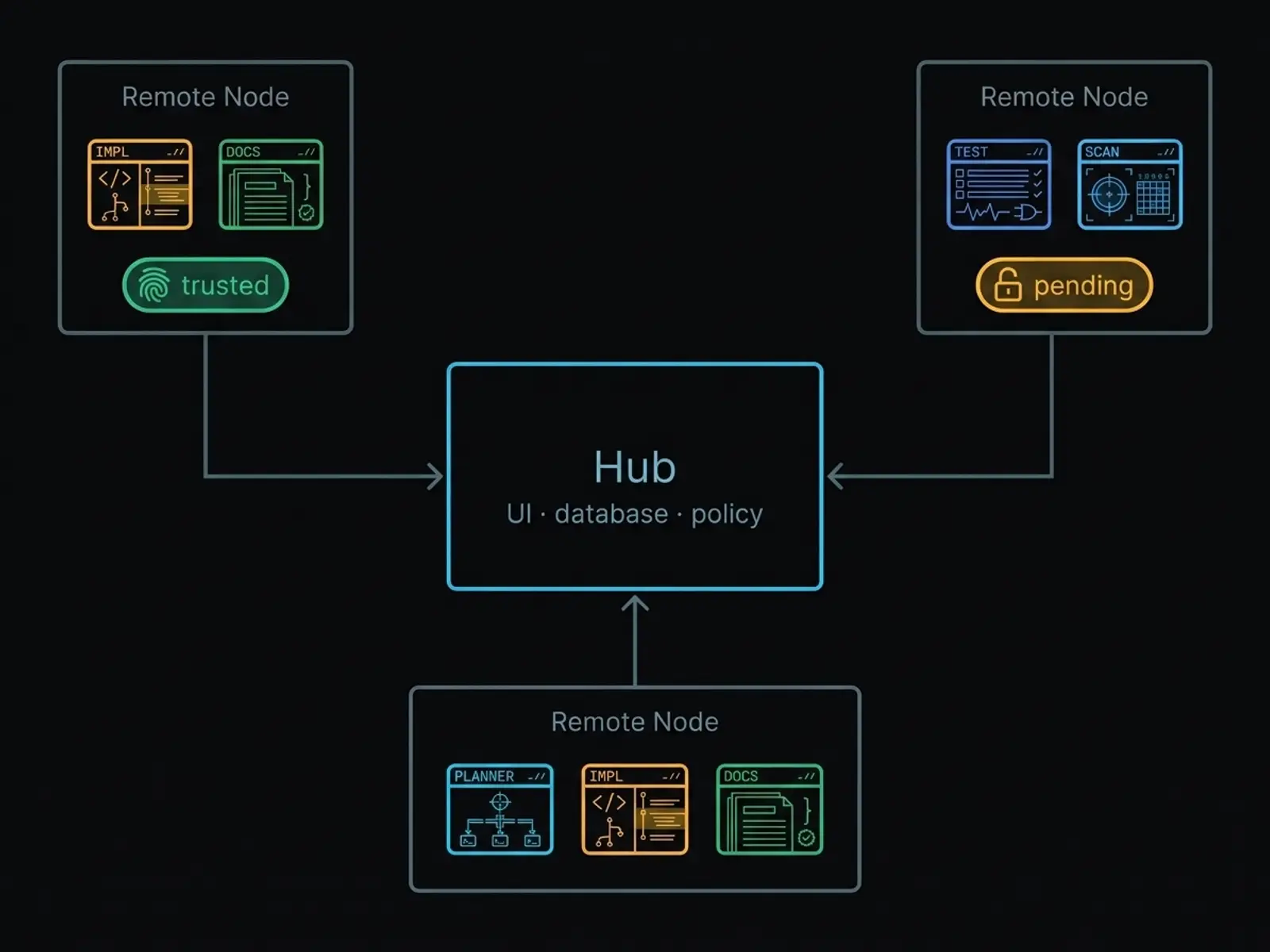
Builder Right, never on the phone. And they don't have to be on one machine, either. Tierwyn has Remote Hosts: agents running on other machines you own, while the hub keeps the database, the UI, the tokens, and the policy.
Host Okay, so how do I add a second box? Do I SSH in and set it up by hand?
Builder Mostly one command. In Settings, under Remote Hosts, you get a one-liner with a single-use enrolment token. It expires in ten minutes. You run it on the other machine, and a small Tierwyn node starts there.
Host And the hub just trusts it?
Builder No. By default the host stays untrusted until you check its key fingerprint and click Trust. Auto-trust exists, but it's opt-in, and off by default. The node's private key never leaves the node.
Host Does the hub have to reach into that machine? Because then I'd be opening ports.
Builder It doesn't. The node dials out to the hub over a WebSocket. The hub never dials the node, so the remote box needs no open ports.
Host Okay. And how do I say which project runs where?
Builder It's per project. You set Runs on to that host, and its conversations spawn agents there. The hub keeps the history and the policy, while the agent CLIs run on the remote machine. You can install, update, and log in to those CLIs from Settings, and the file browser, the Git panel, checkpoints, schedules and MCP all work over that link.
Host What stops a compromised hub from telling the box to do anything?
Builder The policy lives on the box itself: which folders it may touch, and which agents it may run. The hub can't widen it, and there's no generic shell command, only a fixed set of named actions.
Host So: phone in my pocket, agents on any machine I own.
Builder That's the shape of it. So Tierwyn isn't local-only. It just isn't a hosted sandbox, because the machines are yours. And the caveat still holds: it's shell access to your projects from wherever the phone happens to be, so read the security guide first.
Install and day-to-day
Host Fair enough. So, the install. Where do people begin?
Builder One command: npx tierwyn. The first run starts a guided setup. If you'd rather install it globally, it's npm install dash g tierwyn, and there's also a curl one-liner in the README.
Host What needs to be there first?
Builder Linux. Node.js twenty-two point thirteen or newer. Git. And at least one supported agent CLI on your PATH, like claude. Optional extras: a systemd user session for background services, Bubblewrap for sandboxing, Piper or Kokoro for nicer voices, and a TLS reverse proxy if you want to reach it from your phone or another machine.
Host And the daily commands?
Builder Plain tierwyn opens an interactive home screen. Setup installs or updates. Doctor runs diagnostics. Start, stop, restart, config, and update do what you'd guess. Config changes the run mode, port, or password, and update pulls, rebuilds, and restarts. Logs follows the service logs. And linger keeps it running after you log out.
Host And what should a new operator expect from the project itself?
Builder It's a single-maintainer project. Issues are welcome, and pull requests are accepted at the maintainer's discretion. The licence is MIT.
Host Let's close with the plain, unsentimental summary. Tierwyn is for a solo operator who wants local CLIs, one browser workspace on the desk or the phone, explicit delegation, schedules, voice, plugins, and durable conversations.
Builder And it's not for someone who wants a hosted sandbox, a multi-user SaaS, or an internet-facing public API. What it gives you is a clearer control surface over agent tools that still run with real privileges. The next step isn't to trust the slogan. Read the security model, check the install requirements, and decide whether a local command centre fits your own threat model.
Host Tierwyn. "Tiers of agents." Thanks for listening to "Tierwyn, explained."